Nook runs your bookings, your floor and your phone in one calm system. Guests book online or talk to an AI phone agent that knows your tables. Deposits are paid by card, confirmations go by text or WhatsApp, and your team sees everything on your own floor plan artwork.
No fee per guest Set up in about 15 minutes Made in Leeds
Booked by AI phone4 guests · tomorrow 19:30
Table 3 seatedOne tap. Everyone sees it.
AI picked Table 3Best fit. Big tables kept free.
Scroll
FlowNest booking systems already run at three Yorkshire restaurants£0 per cover, ever15-minute booking slotsPlatform hosted in the UK
AI table allocation Your floor plan as artwork AI phone agent Guest CRM Advisor Day, kitchen and allergy sheets Walk-ins in two taps Two-step sign-in Booking page for your website Loyalty Support assistant Card deposits Texts and WhatsApp AI table allocation Your floor plan as artwork AI phone agent Guest CRM Advisor Day, kitchen and allergy sheets Walk-ins in two taps Two-step sign-in Booking page for your website Loyalty Support assistant Card deposits Texts and WhatsApp
A day with FlowNest
From the first coffee to the last table.
Scroll through a normal Saturday. Every screen here is the real product, taken from our demo restaurant.
10:00 · Open the day
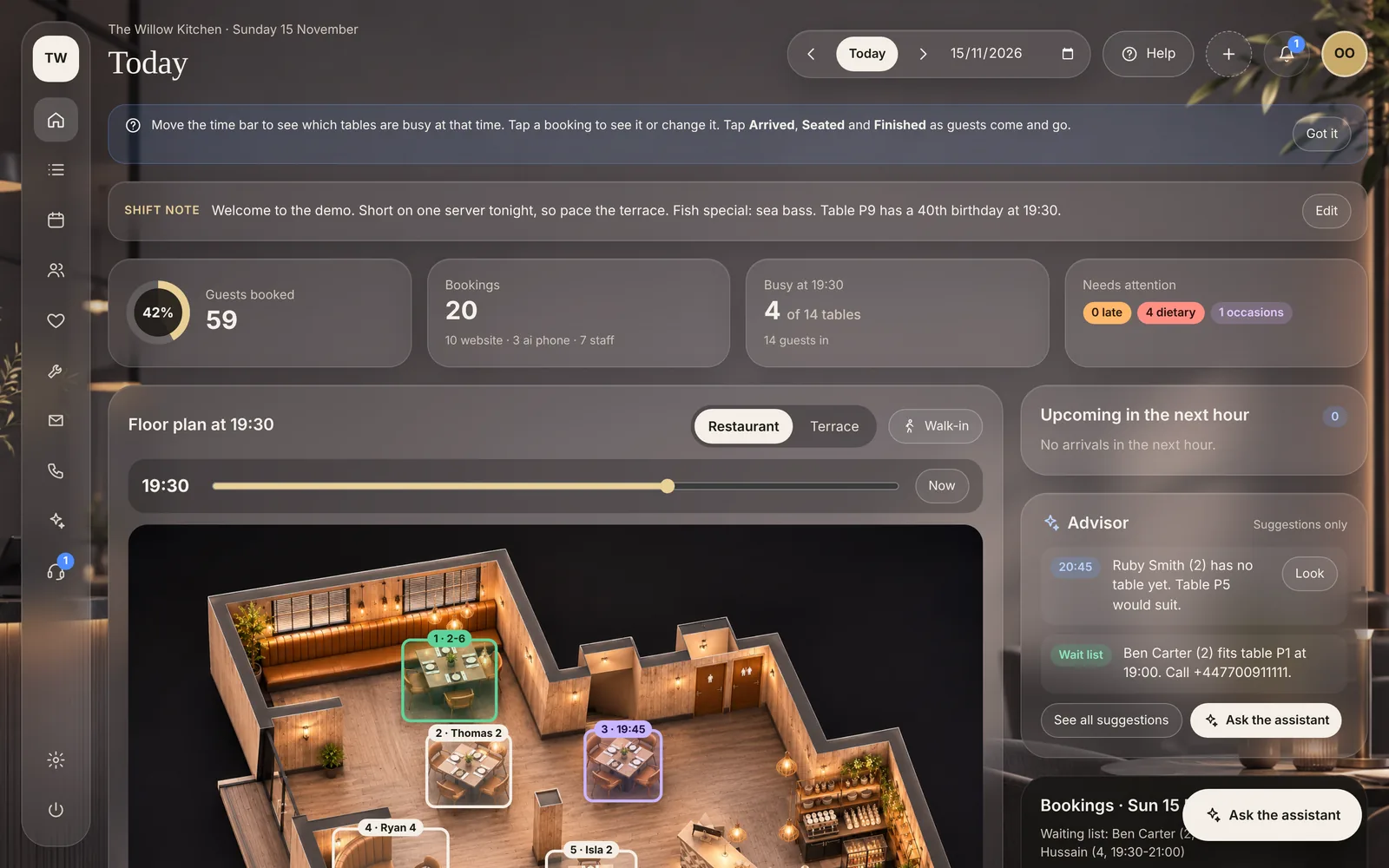
Know the day before the doors open.
One look shows how many guests are coming, the busiest hour, allergies, birthdays and anyone who needs attention. Leave a shift note and the whole team sees it.
Guests, bookings and busy tables at a glance
Allergies, occasions and no-show history flagged
Shift notes pinned for the team
14:20 · A guest finds you on Instagram
Booked in about a minute.
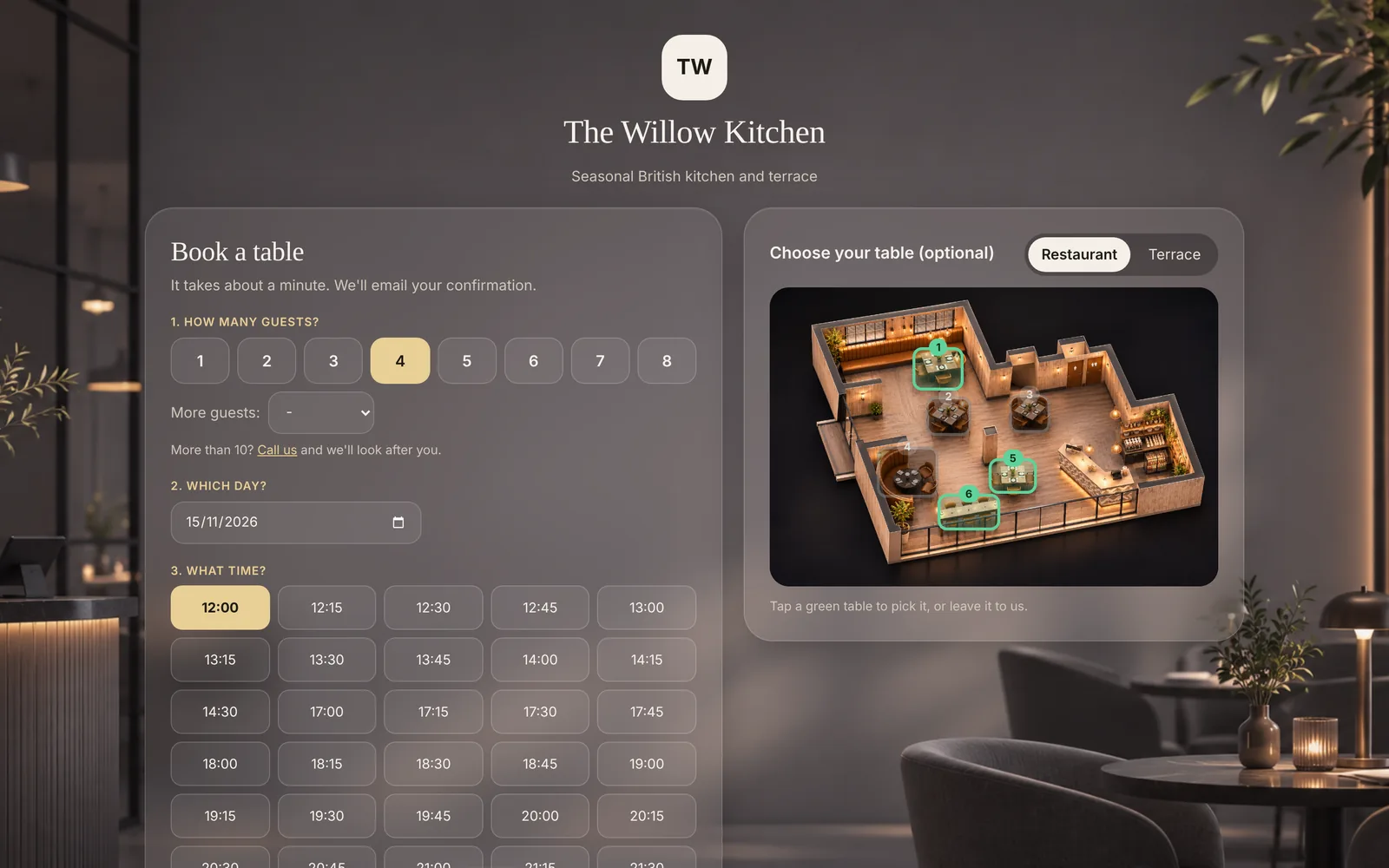
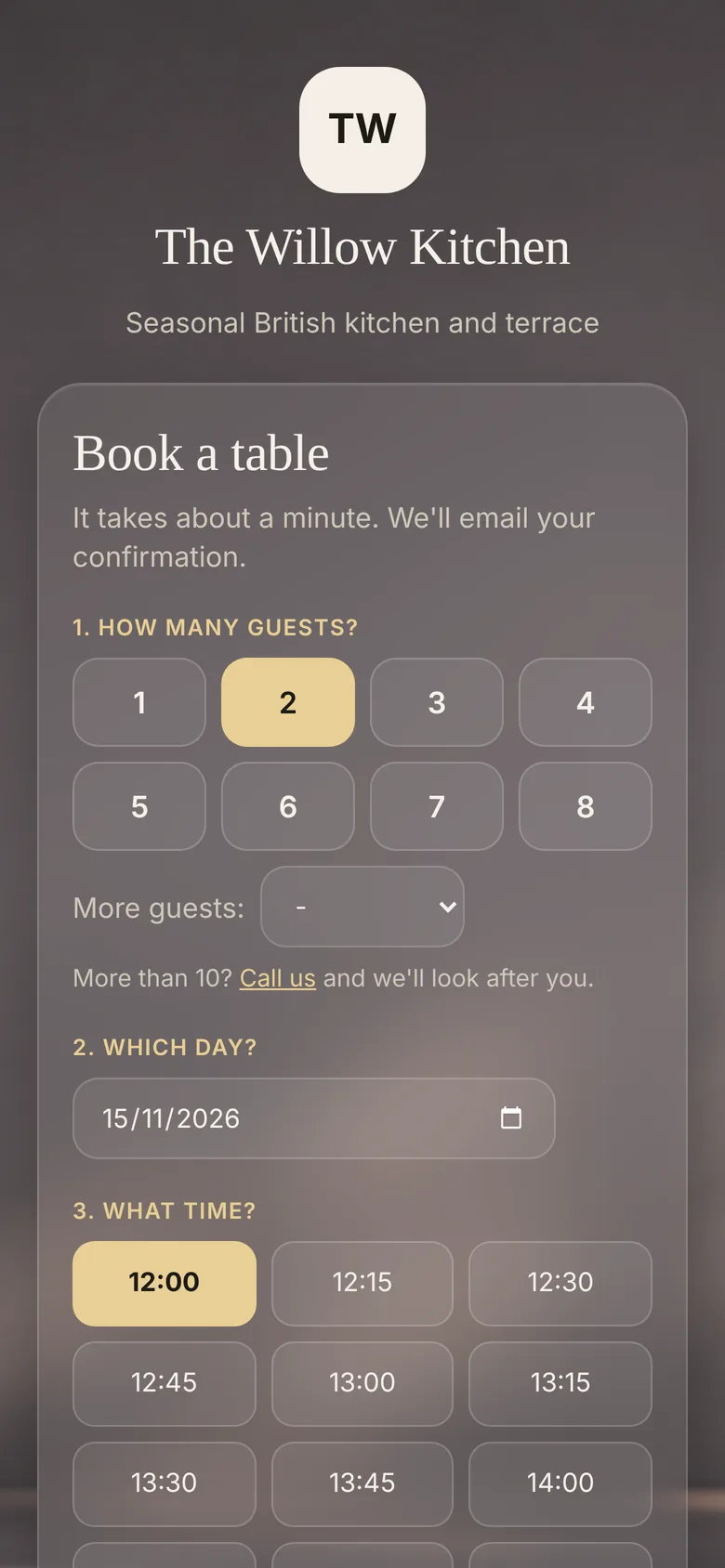
Your booking page shows your name, logo, real availability and your floor plan. Guests pick a time, and a table too if you allow it. They get a confirmation by email, text or WhatsApp, with a link to change or cancel.
Only times you can really seat are shown
Card deposits for large groups, taken at booking
Works beautifully on phones
17:45 · The phone rings mid-rush
The AI phone picks up. Every time.
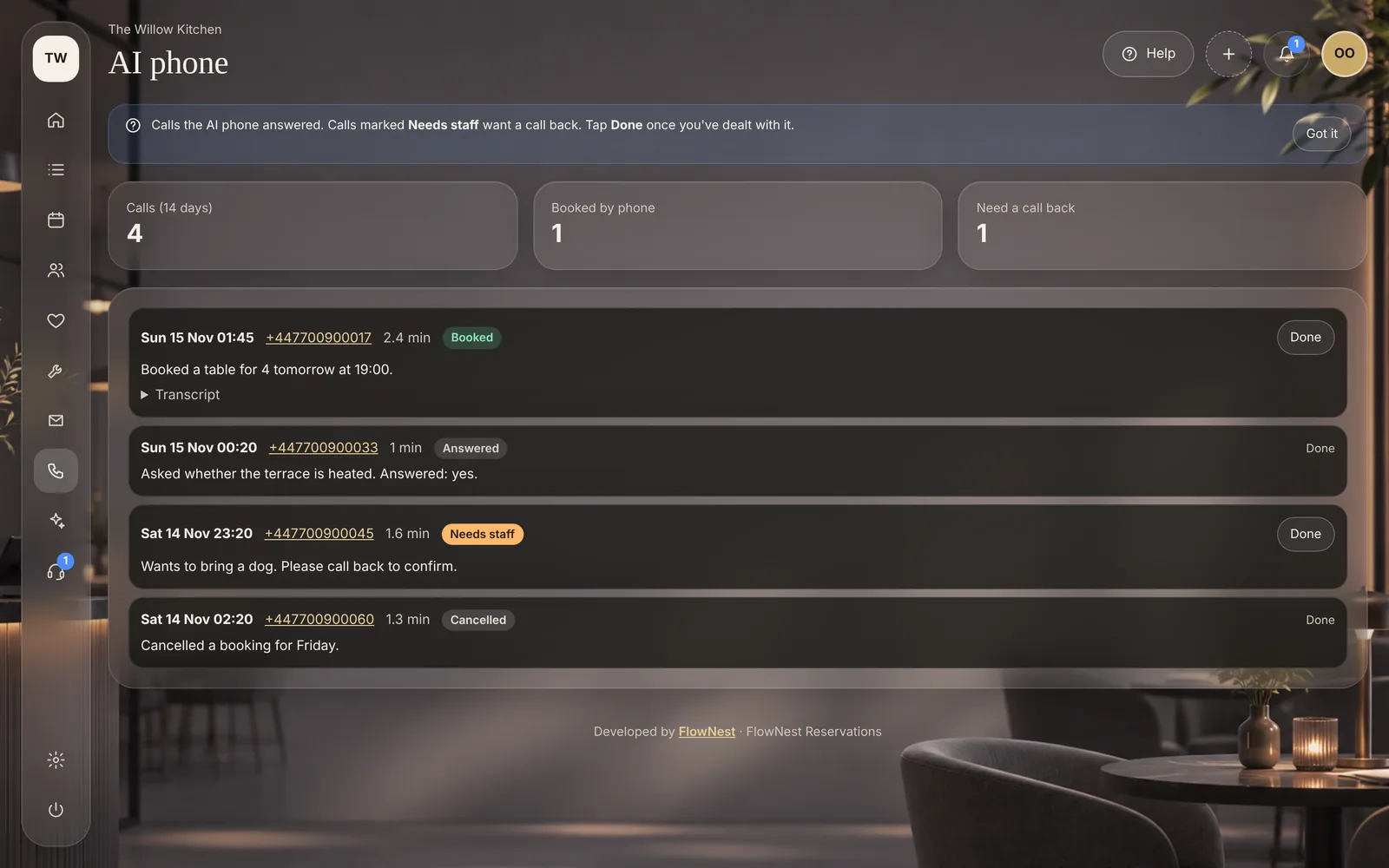
It checks live availability, books the table, answers simple questions and changes or cancels bookings. Every call is logged with a summary and transcript. Anything it can't handle is marked for a call back.
Answers day and night, even during service
Follows the same rules as your website
Calls that need a person are flagged
19:30 · Service
Your floor, live, on your own artwork.
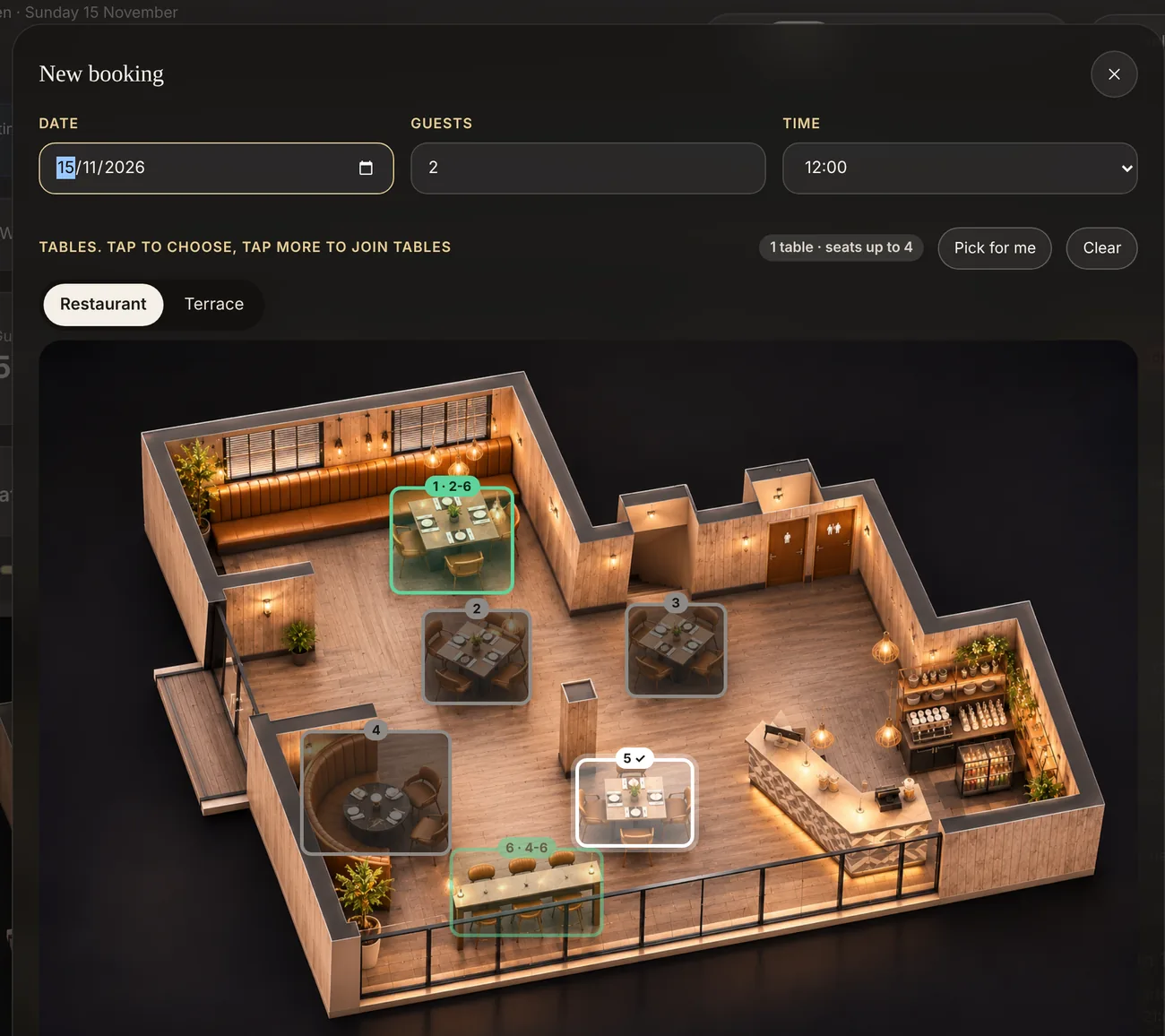
The AI engine has already put every booking on the best table. Tap Arrived, Seated or Finished as guests come and go. Late bookings turn orange. Seat a walk-in in two taps, join tables for a big group, or slide the time bar to see the floor at any moment.
One tap status, seen on every screen
Join any free tables when you need to
A table can never be booked twice
23:00 · Close up
Close the day and get ahead of tomorrow.
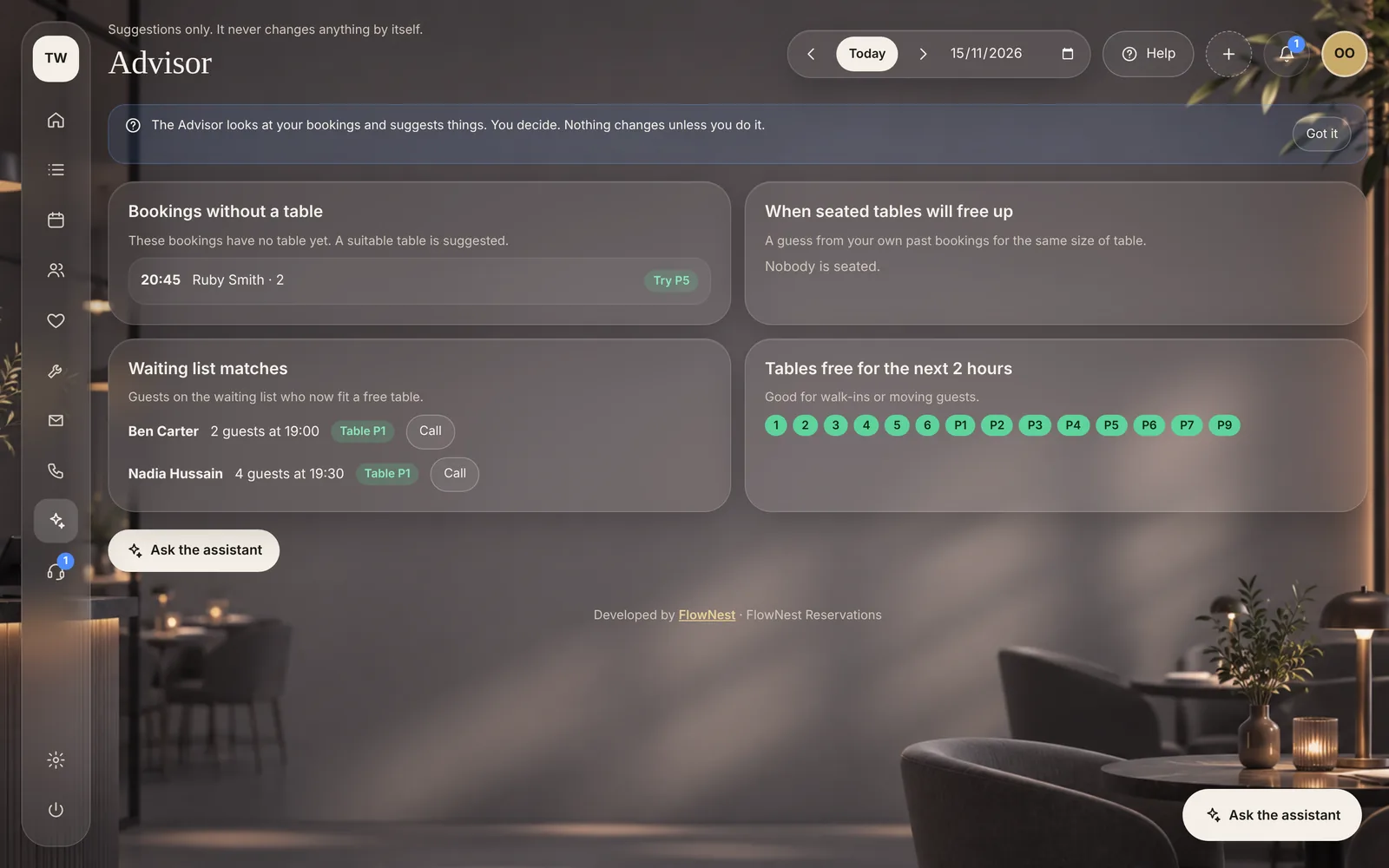
See the end of day summary, print tomorrow's day sheet, kitchen sheet and allergy list, and check the Advisor. It suggests tables for unassigned bookings and spots waiting list guests who now fit. It never changes anything without you.
Day, kitchen, allergy and occasion sheets
Export any dates to Excel
Advisor suggestions, you decide
TodayYour booking page
AI phone callsLive floorAdvisor
The AI allocation engine
Every booking on the right table. Automatically.
At the heart of Nook is an allocation engine that places every booking from your website, AI phone and team on the best table, and keeps the whole evening working.
How the engine decides
Reads the requestGroup size, date, time and where it came from: your website, the AI phone or your team.
Checks every table, liveIs it free for the whole stay? The engine uses your booking length for that group size, adds cleaning time between bookings, and skips blocked or closed tables.
Chooses the best fitThe smallest table that seats the group, so your bigger tables stay free for bigger groups. If no single table fits, it joins neighbouring tables you've marked as joinable.
Locks it inThe table is reserved in the database itself, so it can never be booked twice, however many guests book at once.
Learns from your serviceIt studies how long your guests really stay, by group size, to predict when tables free up and how confident it is.
AI allocationExample from our demo restaurant
4 guestsSaturday 19:30Booked online
Table 22 to 4Booked 19:00 to 20:45
Table 32 to 4Best fit: exactly the right size
Table 52 to 4Also fits, kept as back-up
Table 12 to 6Kept free for a bigger group
Table 64 to 6Kept free for a bigger group
Table 42 to 4Blocked by staff tonight
Booked on Table 3. Tables 1 and 6 stay free for groups of 5 or 6.
Only real availability
Your website and AI phone only offer times the engine can actually seat. No guest is ever promised a table you don't have.
Bigger groups, seated
By saving larger tables for larger groups and joining tables when it makes sense, you fit more guests into the same room.
Predicts free tables
From your own history, it predicts when each seated table will free up, with a High, Medium or Low confidence.
Optimises the evening
The Advisor suggests tables for unassigned bookings, spots table moves that make room for more guests, and shows tables free for the next two hours for walk-ins.
Fills cancellations
When a table frees up, it tells you which waiting list guests now fit, so an empty table becomes a booking.
Your team stays in charge
Switch AI allocation on, or let staff assign tables. "Pick for me" suggests a table in one tap, and staff can always move or join any tables.
Everything in one place
Built for real service, not a spreadsheet.
Every feature can be switched on or off by the owner, so your team only sees what you use.
Your floor plan, turned into artwork.
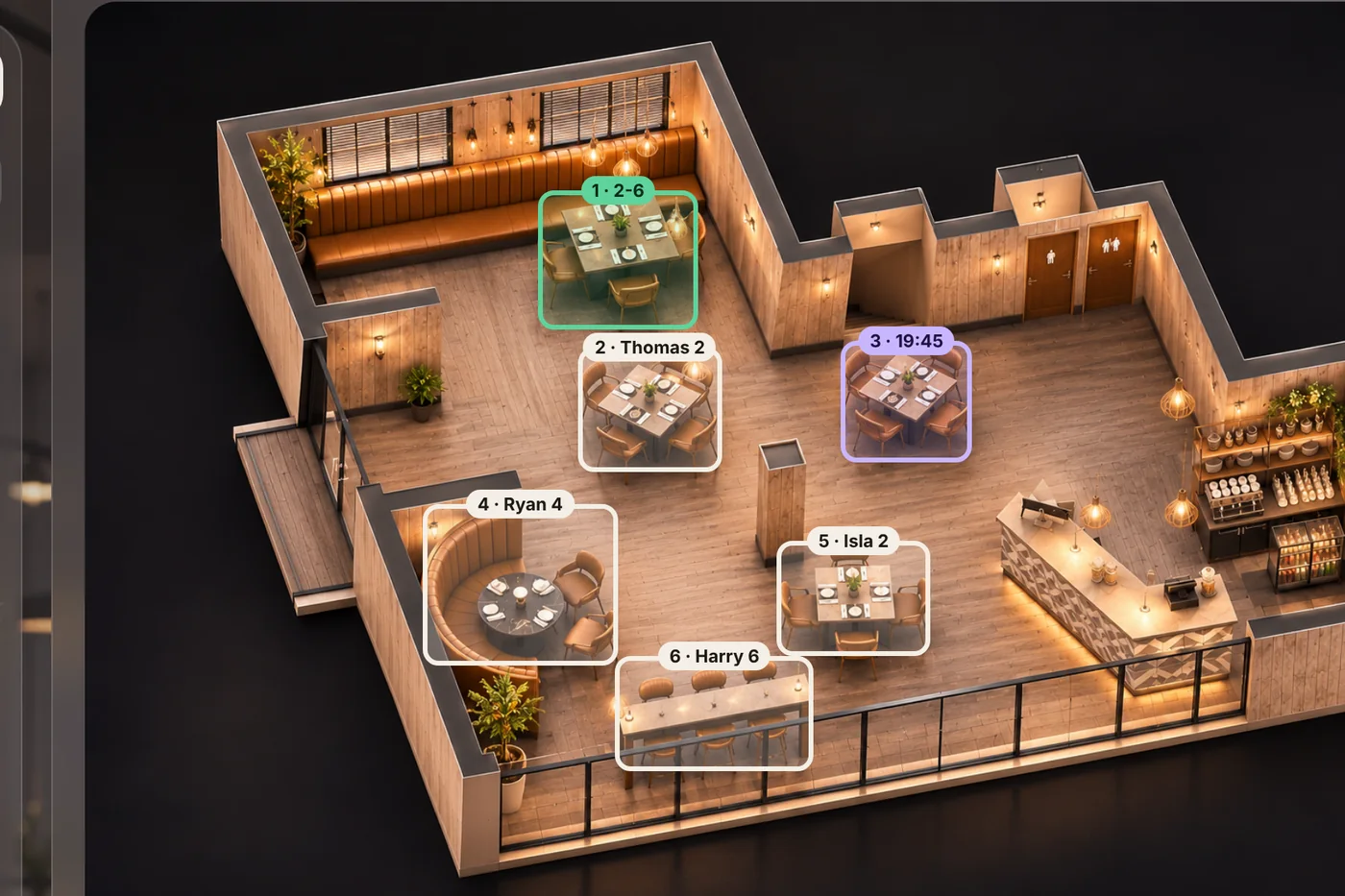
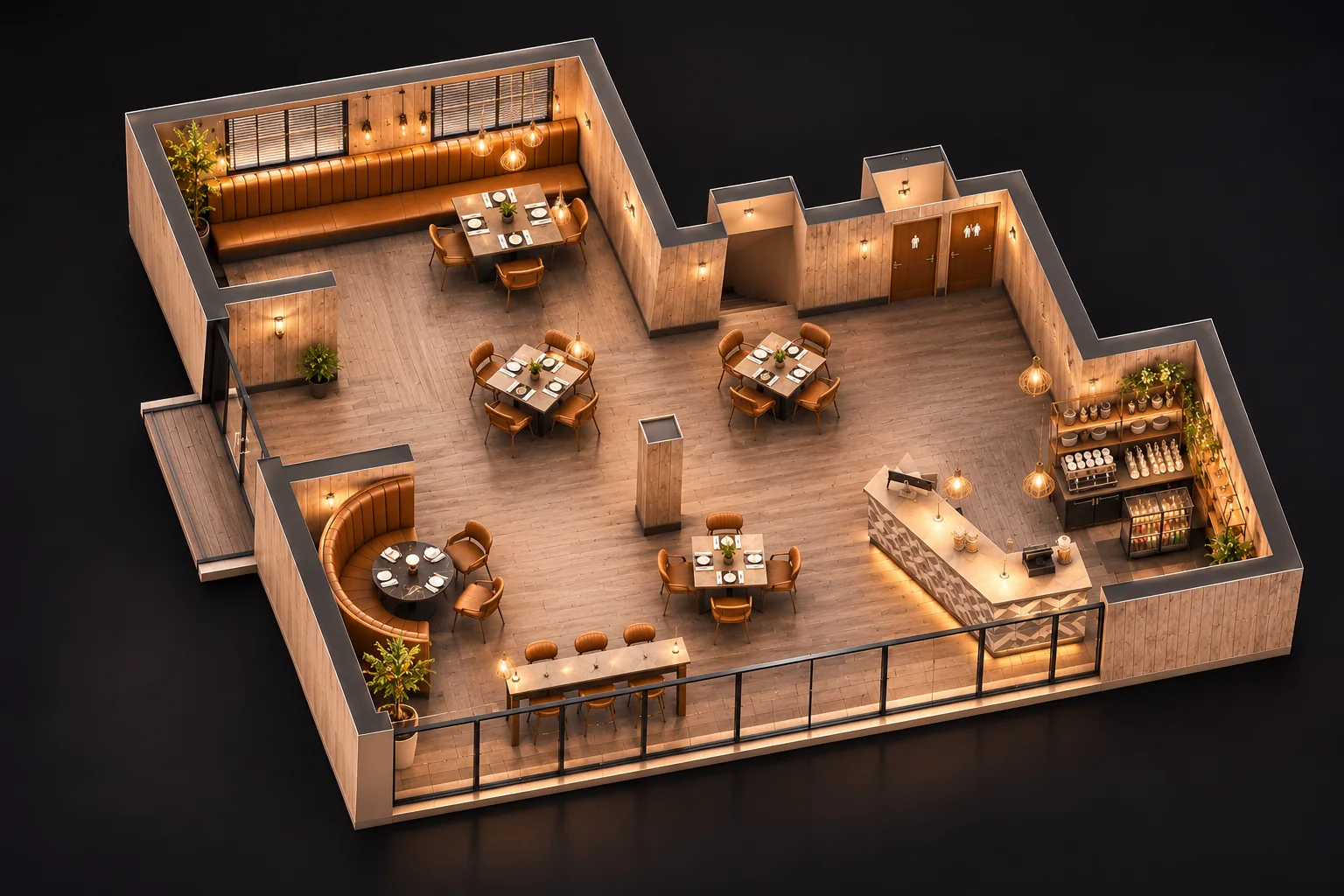
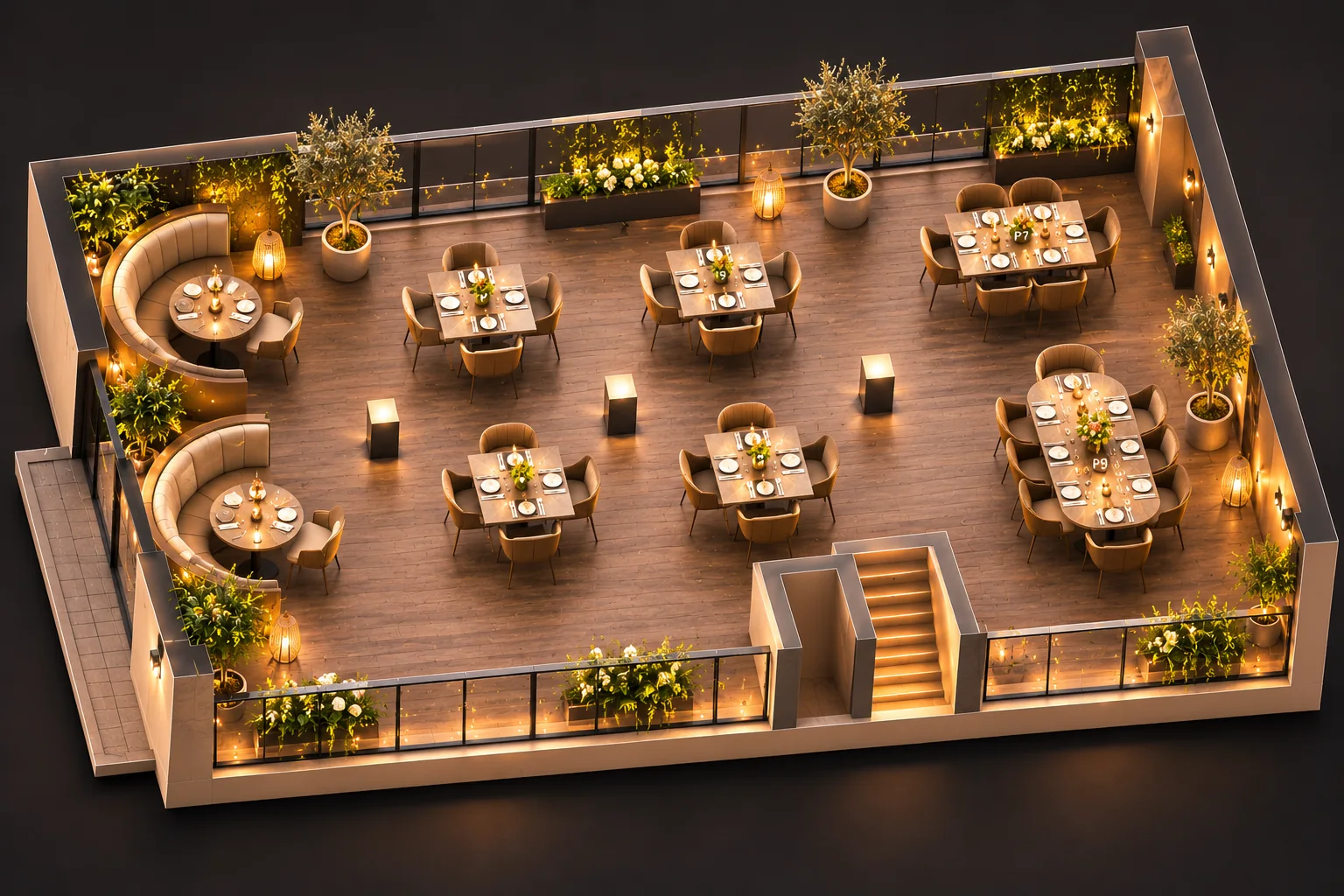
Send us your floor plan and table list. We create a rendered image of your restaurant and map every table onto it. The same artwork appears in your portal, in new bookings and on your guest booking page, so everyone sees the room as it really is.
No double bookings. Ever.
The database itself refuses to put two bookings on one table at the same time. Not a warning on the screen: a rule that can't be broken.
Card deposits, your rules
Large groups, weekend evenings, Christmas Day: set the rules and the amount. Guests pay by card when they book, straight into your own Stripe, Square or SumUp account, with no fee from us. Your website, AI phone and staff all follow the same rules.
Your rules, your hours
Opening hours, last booking times, how long tables are kept for each group size, the largest group online and closed days. Change them yourself in Settings.
Know your guests
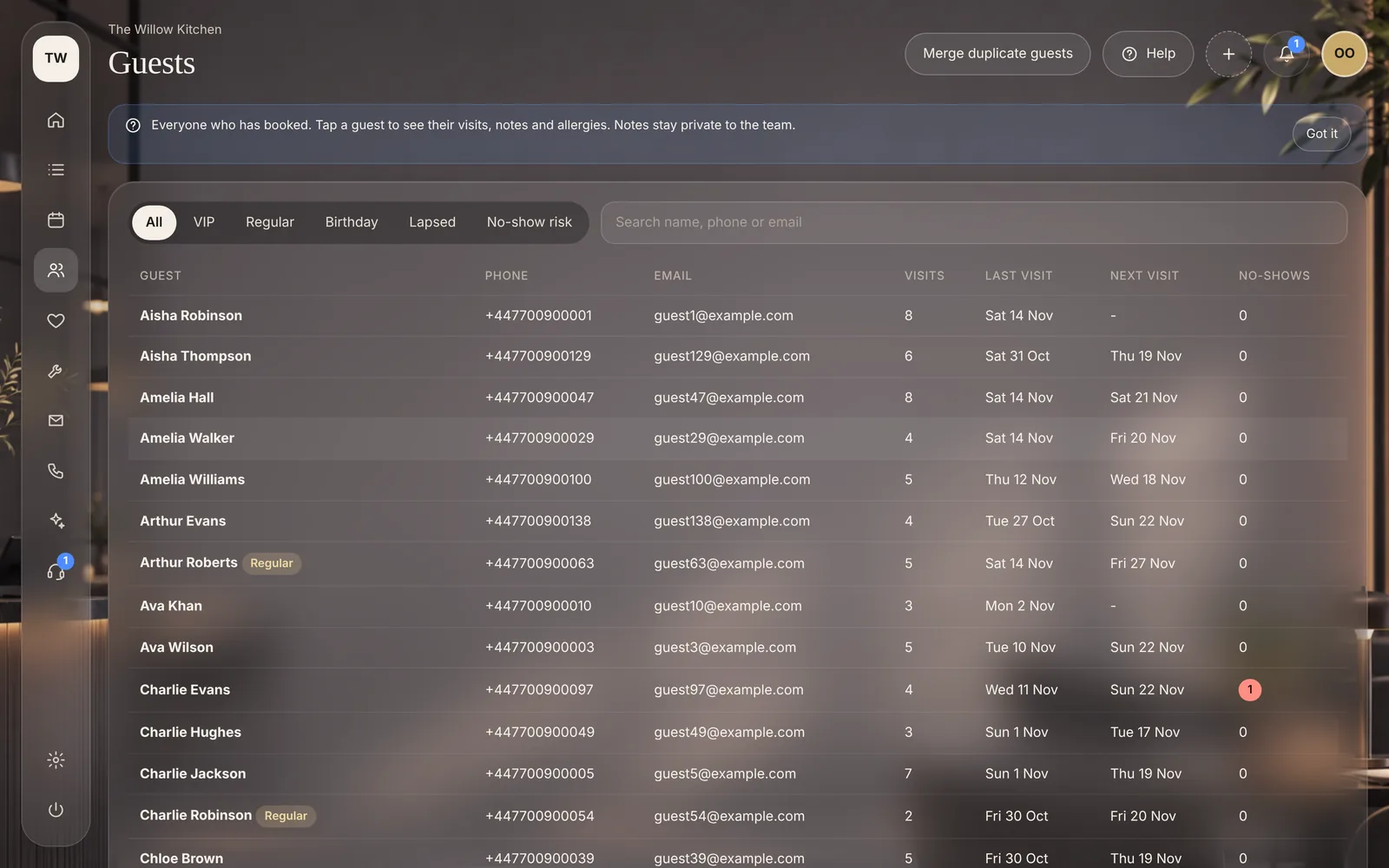
Every guest gets a profile with visits, notes, allergies, tags and no-show history. Spot your regulars, merge duplicates and see who you haven't seen lately.
An Advisor that never takes over
It suggests a table for unassigned bookings, predicts when seated tables will free up from your own history and matches waiting list guests to free tables. You decide.
Staff tools
Day, kitchen, allergy and occasion sheets, table cards, Excel export, block a table, close online bookings, shift notes, message templates and undo a cancellation.
Easy for every team member
Plain words, big buttons, a tablet mode for the host stand, larger text, a guided tour, short help videos and help on every page. Works on iPhone and iPad as well as a computer.
Owners stay in control
Owner, Manager and Staff roles. Invite people by email, remove leavers in one click and require two-step sign-in for the whole team.
A host on the phone who never puts anyone on hold.
Busy restaurants miss calls, and missed calls are lost tables. The AI phone answers in a natural voice, books straight into your diary and follows the same rules as your website.
Checks live availability and books the right table
Finds, changes and cancels existing bookings
Knows your hours, closures, group limits and deposit rule
Hello, you're through to The Willow Kitchen. I'm the restaurant's AI assistant. How can I help?
Hi, have you got a table for four tomorrow, around half seven?
Let me check. I have 19:30 or 19:45 tomorrow for four. Which would you like?
Half seven, please. It's my partner's birthday.
Lovely. Can I take a name and a mobile number?
Sam Patel, 07700 900123.
Thanks, Sam. That's four tomorrow at 19:30, and I've told the team it's a birthday. See you then.
Booked · 4 guests · 19:30 · Birthday noted
Nook Assistant
Support that fixes things, there and then.
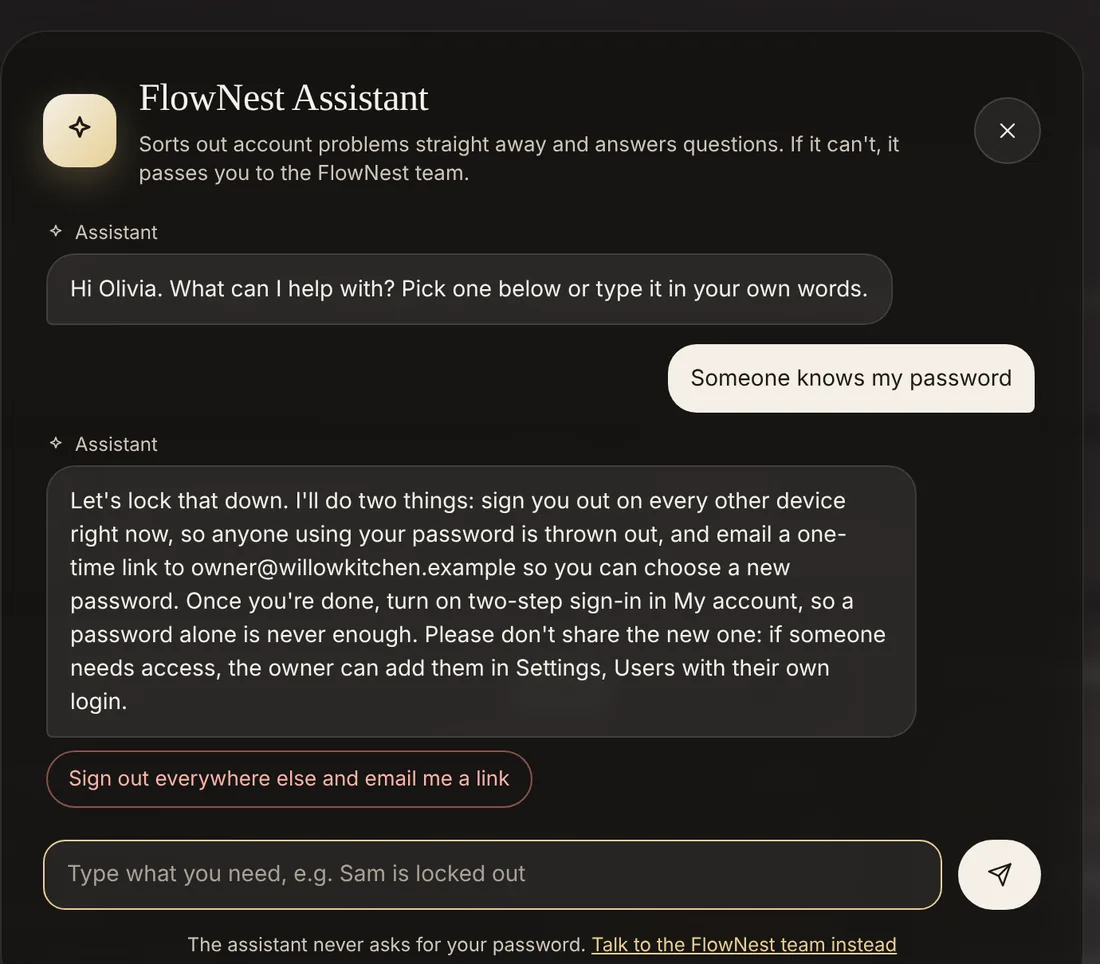
Forgotten password? Someone else knows it? A team member locked out? Ask the assistant inside the portal. It sorts common account problems straight away, answers questions from our help centre, and passes anything else to our team with the chat attached.
Nothing changes until you press its button
It never sees or asks for a password
Real people at FlowNest when you need them
Your booking page
Bookings from your website, Instagram and Google.
One link in your Instagram bio, your Google profile and your website. It shows your branding, your hours and your floor plan, and fills in as guests book.
1
Your Nook address
Ready the moment your restaurant is set up. Share it anywhere.
2
A "Book a table" button
One line of code adds a button to your own website that opens the booking page in a pop-up.
3
Your own web address
Use something like book.yourrestaurant.co.uk, pointed at your booking page with one DNS record.
More ways in
Booked from Google. Run from your pocket.
Two more places your restaurant works: Google Search and Maps for your guests, and an app for your team.
Ready, awaiting Google approval
Book on Google
Guests find you on Google Search or Maps, pick a time and book without leaving Google. Nook is built to Google's booking partner rules: live times from your real tables, the same opening hours and group limits as your own booking page, and every Google booking marked in your portal so you can see what it brings in.
It goes live once Google approves Nook as a booking partner, then it's one switch per restaurant.
The Nook app for iPhone and iPad
Your restaurant portal as an app for the host stand and the floor, with the same screens your team already knows. New bookings and late guests arrive as notifications, and the camera scans bookings at the door and guests' loyalty cards at the till.
For your team only. Guests keep booking on your page or on Google.
Bespoke floor plan service
Your room, as your guests remember it.
Artwork from our demo restaurant. Every restaurant gets its own, made from its real floor plan.
Main room · 6 tables, joinable for larger groupsTerrace · 8 tables, including a long table for 10
Security and privacy
Your guests' details, treated properly.
Each restaurant's data is kept apart by the database itself, on servers hosted in the UK.
Kept apart by the database
Row-level security means one restaurant can never read another's bookings or guests, even if a screen had a bug.
Two-step sign-in
Authenticator app or email code, recovery codes, and owners can make it compulsory for the whole team.
Passwords done right
Stored as strong one-way hashes. Reset links work once and expire in 30 minutes. Accounts lock after repeated wrong attempts.
Hosted in the UK
The platform's servers and database are hosted in the United Kingdom.
Encrypted in transit
Every connection uses HTTPS. Sign-in sessions use secure, HTTP-only cookies.
Encrypted off-site backups
Daily encrypted backups are stored away from the main server, so your data survives even if a server doesn't.
Marketing, Loyalty and Advisor are add-ons, priced separately. Ask our sales team.
12-month agreement, monthly by Direct Debit or yearly with two months free. Texts 8p, WhatsApp 4p, emails free. Card deposits carry no FlowNest fee.
Questions
Good to know.
Do you charge a fee for each guest or booking?
No. You pay one flat monthly price, however many bookings you take. There are no cover fees and no commission.
Is there a contract?
Yes, a 12-month agreement with FlowNest Ltd, which renews unless you tell us 30 days before the end. Change your mind within 30 days and we refund the subscription. The full rules are on the pricing page.
How long does setup take?
Signing up takes about 15 minutes: your details, opening hours, plan and floor plan, drawn in our designer. On Starter you can start straight away. On Booking and AI Phone our team makes your bespoke 3D floor plan in 2 to 5 working days, then we switch your booking page on.
Does the AI phone replace my staff?
No. It answers when your team can't: during service, after hours and when lines are busy. It books, changes and cancels tables and answers simple questions. Anything else is marked for a call back, with a summary of what the caller wanted.
Can I bring my existing bookings across?
Yes. Send us an export from your current system and we'll help you bring future bookings across, so nothing is lost when you switch.
Who owns the guest data?
You do. We process it only on your behalf, under a data processing agreement. The platform is hosted in the UK, and we never sell your data or use it for our own marketing. You can export your bookings to Excel at any time, and we give you a full copy if you leave.
Can I try it first?
Yes. Request a demo and you get your own copy of a sample restaurant for 3 days, with made-up guests. Everything works.
Ready when you are
See your restaurant in Nook.
Try the demo now, or tell us about your restaurant and we'll show you around with your own floor plan.